
Some updates to the side post editor (the tool most of you use for writing and formatting comment posts) went in a little while ago. If you’re experiencing any difficulty (for example, if the buttons look basically like they’ve been put through a blender), clearing your browser cache will fix the problem.
How to clear your browser cache in a few of the latest browsers …
Chrome (Version 31.0.1650.63 m)
- Hit the three-lined icon in the upper right corner. In the dropdown menu, hover over Tools. Select Clear browsing data. You can also Ctrl+Shift+Delete.
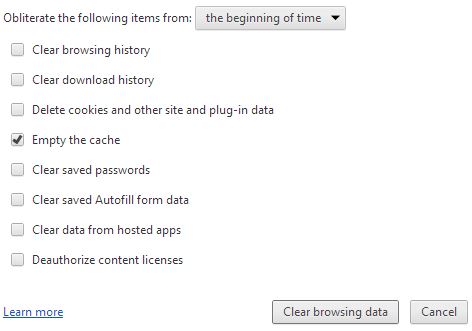
- Set the options as you see below, then click Clear browsing data. When it’s done,
- click your browser’s refresh button and you’ll be good to go.
Internet Explorer (ver. 11.0.9600.15476)
- Click the gear icon in the upper right. In the menu that appears, click Internet options.
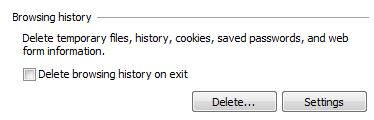
- Part way down the popup that appears, you’ll see a browser history area that looks like the image below. Go ahead and click Delete (It won’t actually delete anything yet…. Microsoft, for you.)
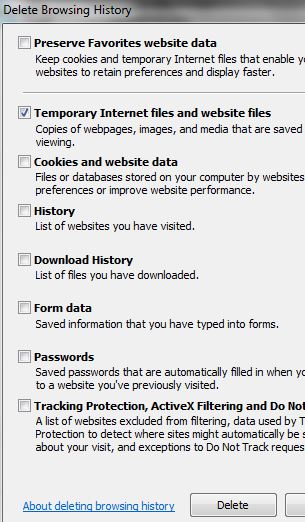
- When you click that Delete button, a popup appears with a bunch of options. Set them as in the image below, then click Delete again. (This time it really will.) Then refresh your browser.
(It might be OK to click Preserve Favorites website data.. not tested. But that really isn’t as important as it sounds anyway.)
Firefox (ver. 26)
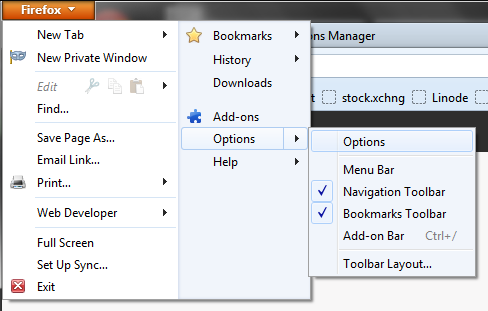
- Assuming you don’t have an extension installed that alters the menu system, go to the Firefox button in the upper left corner.
- Select Options, then Options again as in the image below.
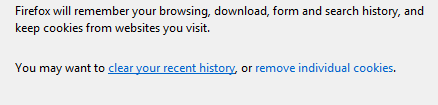
- Go the the Privacy tab then click the “clear your recent history” link.
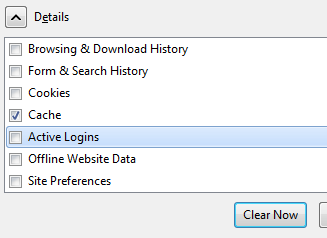
- The Clear Recent History window pops up. Set the options as pictured (only Cache needs to be selected) and click Clear Now.
(Better yet, install one of the cache emptying extensions. They’ll give you a button that does the job in one click.)